


IAA Buyer Salvage Auctions
4.02.45K Reviews
App Specs
- Version
- 2026.08.14
- Updated On
- License
- Free
- Downloads
- 1,000,000+
- Developer
- Insurance Auto Auctions, Inc.
- Categories
- Business
- Platform
- Android, iOS
Screenshots
 Analysis by AppCompare
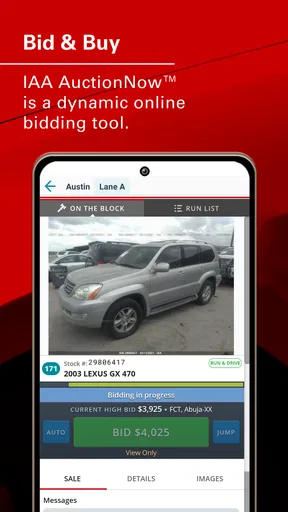
Buying a damaged vehicle through an online auction can feel intimidating the first time. IAA Buyer Salvage Auctions puts IAA’s live internet bidding experience on a phone, so I can browse available vehicles, study auction details, and take part without sitting in front of a desktop computer. I found it most useful as a mobile companion for people who already understand that salvage auctions require careful checking, realistic budgeting, and patience.
This is a free business app from Insurance Auto Auctions, Inc., aimed at buyers who want to interact with IAA auctions from an Android or iOS device. It is rated for Everyone, and its long presence in the stores is reflected in its release history, beginning in December 2011. The current version is 2026.08.14 and requires operating system version 10 or later. Those details matter because an older phone may not provide the smoothest experience, even though the app itself is not difficult to approach.
What the mobile auction experience is really like
The first thing I noticed is that this is not a general car-shopping app. It is built around salvage and damaged-vehicle auctions, where the attractive price is only one part of the decision. A vehicle may need repairs, transport, inspection, parts, paperwork, or all of those together. The app helps me participate in the auction process, but it does not remove the responsibility of deciding whether a particular vehicle makes financial sense.
That distinction is important for a first-time buyer. A normal classified listing usually gives me a seller’s asking price and a chance to ask questions. An auction app creates a different rhythm: I search, compare, inspect available information, follow auction activity, and decide how far I am willing to go. The pressure comes from timing, so preparing before bidding is more valuable than reacting quickly when the auction is active.
The app’s store rating sits at a 4.0 average from around 13 thousand ratings, with about 2.5 thousand written reviews. It has passed the million-install mark, which suggests that it is not a niche experiment but a regularly used tool in the salvage-auction space. I would still treat those figures as a sign of broad use rather than proof that every buyer will have a perfect experience. Auction apps are judged heavily by connection quality, inventory expectations, and how well the user understands the process.
For me, the strongest reason to use it is convenience. I can check a vehicle while away from my desk, keep an eye on an auction, and avoid being tied to a full browser session. The trade-off is that a phone screen is less comfortable for detailed comparison. When I am reviewing several vehicles, I prefer a larger display or a separate notes system, then use the mobile app for monitoring and action.
Who will get the most from it
This app makes sense for a buyer who already has a clear purpose: finding a repairable project, sourcing a replacement vehicle, looking for parts, or following a particular auction opportunity. It is also useful for someone who travels frequently and cannot depend on being at a computer during auction activity.
Worth Reading Before You Choose

EA SPORTS FC Mobile 26 Is a Bigger Football Game, but It Takes Time

Flipboard Shows What News Apps Must Do Beyond the Feed

Switching to Android Auto Means Rethinking Your Driving Routine

Google Calendar Makes a Crowded Week Easier to Manage

Ludo King Makes the Most of the Minutes Between Plans

Baby Panda World Brings Quick Play to Modern Phones, but Its Game Library Feels Busy
I would be more cautious recommending it to somebody who simply wants an inexpensive everyday car with predictable running costs. Salvage vehicles can involve unknown damage and extra work, and the app cannot turn that uncertainty into a normal used-car purchase. If reliability, a straightforward test drive, and a simple return process are your priorities, a conventional dealership or classified marketplace may be a better fit.
Setting up without rushing into a bid
After installing the app, I would begin by making sure the device meets the operating-system requirement and that the phone has a dependable connection. The most frustrating time to discover a compatibility or connectivity problem is while an auction is moving quickly. I would also sign in carefully and make sure account details are correct before spending time building a watchlist or planning a purchase.
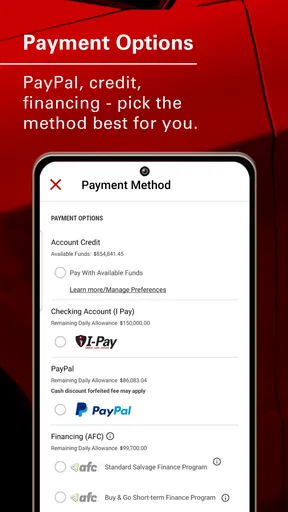
My advice is to treat setup as preparation rather than a formality. Keep your buyer information, payment plans, transport options, and repair budget in mind before you start browsing seriously. The app can bring an auction to your phone, but it cannot make a vehicle affordable after towing, storage, parts, labor, and registration are added.
A useful first exercise is to search for vehicles you do not intend to buy. This lets you learn how the listings are organized and how quickly you can move between a vehicle’s main details and the auction activity. I prefer this approach because it removes the emotional pressure of a vehicle I already want. Once I understand the flow, I can return to real candidates with a clearer head.
Another practical habit is to keep a simple comparison note outside the app. I record the stock or listing reference, visible damage, likely repair category, transport distance, and my absolute spending limit. This is not glamorous, but it prevents the common mistake of remembering the attractive details while forgetting the expensive ones. A phone auction tool is fast; my decision process should be deliberately slower.
Reaching a first meaningful success
For a new user, the first success should not necessarily be winning a vehicle. I consider the first meaningful success to be completing a full evaluation without making an impulsive bid. Choose one listing, inspect every available detail, estimate the total project cost, and decide whether it still deserves attention. If the answer is no, the app has already helped you avoid a poor purchase.
If the vehicle remains interesting, set a maximum bid before the live auction becomes exciting. I would write that limit down rather than relying on memory. The maximum should reflect the complete project, not just the amount displayed during bidding. Once the limit is reached, stopping is part of using the app successfully.
A realistic scenario would be a buyer searching for a damaged vehicle to repair over weekends. On a lunch break, I might use the app to locate a promising listing and save its details in my notes. In the evening, I could review the damage, check whether transport is practical, and compare the likely repair bill with the cost of a ready-to-drive alternative. During the auction, I would follow the activity from the phone only if my ceiling remains sensible. If bidding passes that point, walking away is the correct result.
That workflow highlights a strength that is easy to miss: the app separates discovery from commitment. I can use it to narrow choices before an auction, then use the live bidding function only when I have already done the thinking. This is safer than opening the app for the first time during an active sale and making a decision based on urgency.
Where first-time users can become confused
The word “salvage” deserves attention. A low auction price does not mean the vehicle is ready for normal road use, and a clean-looking photograph does not reveal every mechanical or structural issue. I would never treat the app’s bidding interface as a substitute for a professional inspection, a careful history review, or a repair estimate. If an in-person inspection is possible, arranging one can be more valuable than spending extra time watching the bid screen.
Another source of confusion is the difference between interest and affordability. A listing can look attractive because the visible damage seems manageable, but the final cost may include work that is difficult to predict from a phone. Parts availability, labor rates, towing distance, and the buyer’s own skill level can change the calculation. I use the app to identify opportunities, not to convince myself that every opportunity is a bargain.
Live bidding can also encourage a narrow focus on the current bid. I find it better to think in terms of a complete budget and a firm exit point. If I am buying for resale, I include a margin for delays and surprises. If I am buying for personal use, I ask whether the finished vehicle will provide enough value compared with a conventional used car. The right answer may be different for a professional rebuilder than for a first-time hobbyist.
There is also a practical screen-size limitation. A mobile layout is convenient for checking one listing or following activity, but it is not always the best environment for comparing many vehicles side by side. I would use a larger screen when I need to study several candidates, organize research, or review repair estimates. The phone is strongest when it keeps the auction process close at hand, not when it replaces every other research tool.
How it compares with ordinary car apps
Compared with classified marketplaces, this app is more specialized and more action-oriented. A classified app is usually better for browsing ordinary used vehicles, arranging a test drive, and negotiating directly with a seller. IAA Buyer Salvage Auctions is better when the goal is to participate in IAA’s auction environment and follow damaged-vehicle inventory from a mobile device.
Compared with using a mobile browser, a dedicated app feels more focused. I do not have to begin with a general web search, and the experience is designed around the auction service rather than a broad collection of unrelated pages. The disadvantage is that a browser can be easier for opening multiple research tabs, copying information into a spreadsheet, or moving between independent sources.
Compared with an in-person auction, the phone offers flexibility but less physical confidence. I can monitor activity from almost anywhere, yet I cannot use the screen to feel a panel, listen to an engine, or inspect a difficult-to-see area. For high-value decisions, I would combine the app with physical inspection or trusted professional advice rather than treating remote bidding as a complete replacement.
Small habits that make the app more useful
Separate research days from bidding days. I shortlist vehicles first and make bidding a later decision. This reduces the chance that live activity will replace proper evaluation.
Use a written ceiling. My limit includes the vehicle and the expected project costs, not merely the number shown in the auction screen.
Compare the finished result with a normal used car. The salvage route is worthwhile only when the total risk and work still offer a convincing advantage.
Keep transport in the calculation from the beginning. A vehicle that looks promising locally may become far less attractive when moving it is difficult or expensive.
Test the app before an important auction. Browsing a few unrelated listings helps me learn the controls without the pressure of a vehicle I genuinely want.
These habits also answer a question many beginners have: can the app itself tell me whether I should buy? No app interface can make that decision responsibly for me. Its value is in giving me mobile access to the auction process and helping me act on research I have already completed. The quality of the result depends on the quality of my inspection, budget, and judgment.
When another option is the smarter choice
I would skip this app if I am not prepared to handle salvage-related uncertainty. Someone looking for a simple purchase with known condition should begin with a conventional used-car source. Someone who needs extensive comparison tools may prefer a desktop browser or spreadsheet alongside the app. And someone who cannot arrange transport or repairs should solve those problems before bidding, not after winning.
I would also avoid making the app my only source of information. It is useful for the IAA auction workflow, but independent research remains important. Repair costs, local requirements, insurance considerations, and resale expectations can vary widely. The app is a doorway into the auction, not a complete ownership plan.
My recommendation for a careful first purchase
After using it as a mobile auction tool, I see IAA Buyer Salvage Auctions as a practical choice for informed buyers who want IAA bidding access in a convenient format. Its free price lowers the barrier to trying it, and the Everyone age rating makes it broadly accessible, while the developer’s long-running product history gives it a more established feel than a newly launched auction utility.
Still, I would recommend it with one condition: install it to research and learn before you install it to bid. The best first outcome is a controlled process—find a suitable vehicle, understand its condition, calculate the full cost, and stop when the numbers no longer work. If you approach it that way, the app can make salvage auctions more manageable without pretending that they are risk-free.
For a first-time user, my path would be simple: confirm the phone requirement, sign in, browse without bidding, choose one listing to analyze, write down a complete budget, and only then follow a live auction. That sequence turns an unfamiliar mobile auction into a series of manageable decisions. The app is most valuable when it helps you stay disciplined, not when it tempts you to act faster.
In short, I would recommend IAA Buyer Salvage Auctions to repairers, parts buyers, experienced vehicle shoppers, and curious newcomers willing to do serious homework. I would not recommend it as a shortcut to a cheap, worry-free car. Used with research, a firm limit, and realistic expectations, it is a convenient way to bring IAA’s auction experience to a phone.
Pros
- Access to thousands of salvage vehicles from insurance auctions.
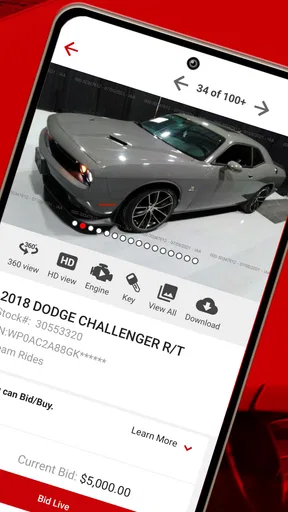
- Detailed listings include damage
- photos
- title
- and auction information.
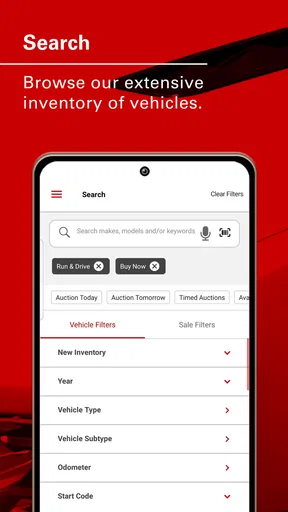
- Search filters make it easier to find vehicles matching your needs.
- Useful for dealers
- rebuilders
- exporters
- and experienced private buyers.
- Auction alerts help users keep track of interesting vehicles and bids.
Cons
- Many vehicles require extensive repairs before they can be driven.
- Final costs may include buyer fees
- storage
- shipping
- and taxes.
- Vehicle history and damage details may not reveal every hidden issue.
- Bidding can become expensive when several buyers compete for the same car.
- Some listings may have restricted titles or limited registration options.
FAQs for IAA Buyer Salvage Auctions
What is IAA Buyer Salvage Auctions?
IAA Buyer Salvage Auctions is a mobile platform connected with IAA, formerly Insurance Auto Auctions, where users can browse vehicles offered through salvage, insurance, and other automotive auctions. The app can help you review listings, photos, vehicle details, auction dates, locations, and bidding information. It is mainly intended for people interested in purchasing damaged, repairable, used, or salvage vehicles.
Do I need an account to bid on vehicles through the app?
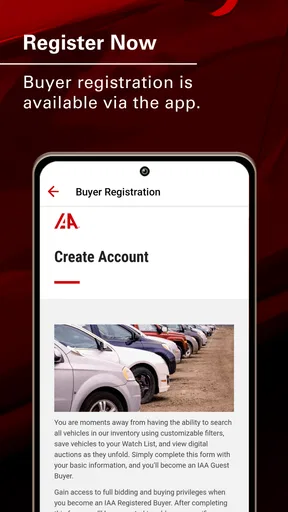
You can generally browse many vehicle listings without completing the entire registration process, but an account is normally required to participate in auctions or place bids. Depending on your location and the vehicle type, IAA may also require buyer eligibility, identity verification, business documentation, or registration with an approved broker. Requirements can vary by state, country, and specific auction inventory.
Can anyone buy a vehicle listed on IAA Buyer Salvage Auctions?
Not every vehicle is available to every buyer. Some listings may be open to the public, while others are restricted to licensed dealers, dismantlers, rebuilders, exporters, or buyers represented by a broker. The listing details and auction rules usually indicate the applicable buyer requirements. Before bidding, check title restrictions, local laws, fees, and whether you are legally allowed to purchase that vehicle.
What should I check before bidding on a salvage vehicle?
Before placing a bid, carefully inspect the listing photos, damage description, title type, odometer information, vehicle history, keys, condition notes, and auction location. Remember that online images may not reveal mechanical, electrical, flood, or structural problems. If possible, arrange an in-person inspection or use a qualified inspector. Also estimate transportation, repairs, storage, taxes, buyer fees, and registration costs.
Are there additional fees after winning an auction?
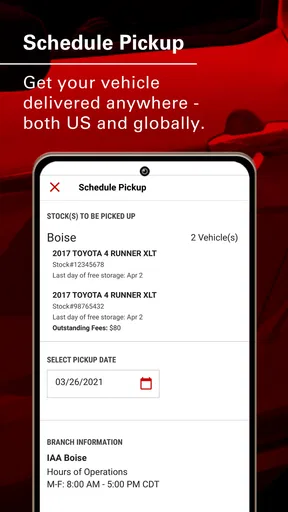
Yes. The winning bid is usually only part of the total purchase cost. Buyers may need to pay auction fees, online bidding charges, documentation or service fees, sales tax, title-related expenses, storage charges, and transportation costs. Late payment or delayed pickup can create additional penalties. Review the current IAA fee schedule and the specific auction terms before bidding, because charges may differ by location and buyer status.


